N,m component
Form of n,m component:
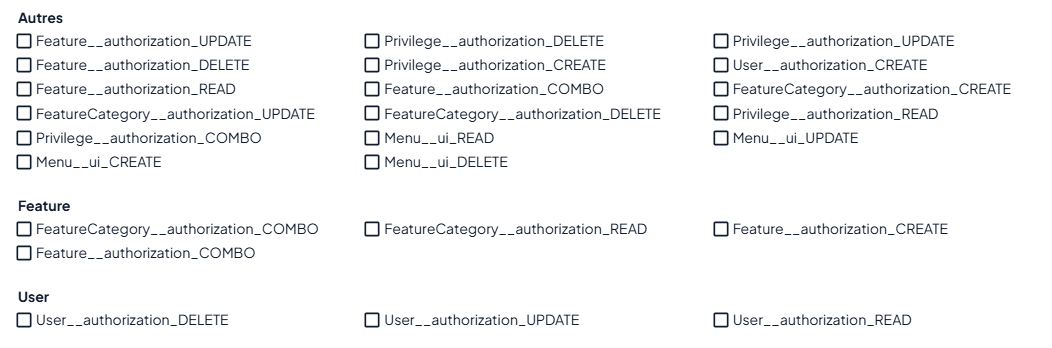
Here, we'll take the example of the Aggregate Root Privilege, which has Features. This relationship will be shown by the PrivilegeFeature intermediate table. And Features have a FeatureCategory foreign key that categorizes them.
The n,m component is used in multiselect cases, where the options are categorized, and there is usually a table between the parent entity and the child entity on which the n,m component is to be used.
Xml configuration
To generate it in the form and in the fiche, you need to specify the uiNmComponent=“true” property in the Aggregate Root Privilege.xml, at collection level in the PrivilegeFeature, to indicate that you want the display to be an n,m component for this collection. This display only works under certain conditions: it must contain only one ForeignKey in the collection, and nothing else.
<?xml version="1.0" encoding="UTF-8"?>
<DomainModel ...>
    <AggregateRoot...
			   ClassName="Privilege">
        <DefiningProperties>...</DefiningProperties>

        <Collections>
            <Collection ...
                ClassName="PrivilegeFeature"
                uiNmComponent="true"
            >
                <ForeignKey ...
		                ParentClass="Feature"
                />
            </Collection>
        </Collections>

        <UserInterface >... </UserInterface>
    </AggregateRoot>
</DomainModel>
We also need to configure the Feature.xml (the one we want to categorize). Set the CategoryColumn property, which is the name of the column we'll use to categorize the Features. This property can only used in the <ForeignKey /> and <Property /> tags, and can only be used once by Aggregate Root. This information will be useful for setting up the endpoint used to retrieve Feature Options with their categories.
<?xml version="1.0" encoding="UTF-8"?>
<DomainModel ...>
    <AggregateRoot ...
            ClassName="Feature"
    >

        <DefiningProperties>...</DefiningProperties>

        <ForeignKeys>
            <ForeignKey ...
                ParentClass="FeatureCategory"
                CategoryColumn="name"

            />
        </ForeignKeys>

        <UserInterface>...</UserInterface>
    </AggregateRoot>
</DomainModel>
Endpoint activation
Next, to activate the endpoint for retrieving categorized Feature Options, when we generate the Features controller, we need to add the “-combo-nm” argument.
Style preference
When the Privilege form is finally generated, style parameters for grid width are available in the childrenFields and in the “categorized” property.
/**
 * Aggregate roots can have children, such as a Student having multiple entities like diplomas, grades, etc.
 * These collections are represented as lists displayed through different tabs on the form page.
 * `childrenFields` represents the props for the lists and forms of the children of an aggregate root.
 */
const childrenFields: FieldProps[] = [
    {
        "key": "features",
        "name": "Features",
        "fields": [
            {
                "field": "featureId",
                "headerName": "Feature",
                "width": 100,
                "resizable": true
            }
        ],
        "categorized": {
            "value": true,
            "xs":12,
            "sm":6,
            "md":4
        }
    }
];
Special case: category null
In the case when category of the Option is null, this value is set in the FeatureFinder's getAllOptionsCategorized query.